
ADTRAN Cables
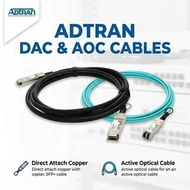
Shop ADTRAN cables and connectivity accessories for compatible NetVanta switches, routers, Total Access gateways, and business networking equipment. Hummingbird Networks helps businesses source ADTRAN network cables, direct attach cables, console connections, and model-specific connectivity accessories for equipment installation, replacement, and network expansion.
Whether you are connecting an ADTRAN switch to another network device, replacing a damaged cable, configuring a NetVanta router, or maintaining existing telecommunications infrastructure, the right cable depends on the device model, interface type, connector, supported speed, and required length. Explore ADTRAN cable options and compatible networking connections designed for business, branch office, and service-provider environments.
ADTRAN Network Cables and Connectivity Accessories
ADTRAN networking equipment supports a range of physical connections for Ethernet networking, device management, telecommunications interfaces, and high-speed uplinks. Cable requirements vary by product family and installation.
Common ADTRAN cable applications include:
- Ethernet connections for compatible NetVanta switches and routers
- SFP and SFP+ direct attach connections between supported network devices
- Console and serial management connections
- T1 and telecommunications interface cabling
- Network equipment replacement and maintenance
- Branch office and telecommunications closet installations
Not every cable type is compatible with every ADTRAN device. Confirm the exact model, interface, connector pinout, and manufacturer requirements before ordering.
ADTRAN Ethernet Cables
Ethernet patch cables connect compatible ADTRAN network equipment to switches, routers, computers, access points, IP phones, and other Ethernet devices.
Common Ethernet cabling categories include Cat5e, Cat6, and Cat6a. The appropriate cable depends on the supported network speed, link distance, installation environment, and equipment interfaces.
Cat5e Ethernet Cables
Cat5e cables are commonly used for Gigabit Ethernet connections in business networks. They can be suitable for compatible ADTRAN equipment operating over standard twisted-pair Ethernet interfaces.
Cat6 Ethernet Cables
Cat6 cables provide an option for business Ethernet connections where additional cabling performance is desirable. Supported speeds and distances depend on the complete cabling channel and connected equipment.
Cat6a Ethernet Cables
Cat6a cabling supports 10 Gigabit Ethernet over compliant channels up to 100 meters. It can be appropriate for higher-bandwidth installations using compatible network equipment.
Explore our Cables selection for additional Ethernet and network connectivity products.
ADTRAN Direct Attach Cables
ADTRAN direct attach cables provide short-distance connectivity between compatible pluggable network interfaces. These preterminated cable assemblies are useful when switches or other network devices are installed in the same rack or nearby equipment racks.
Unlike a connection using separate optical transceivers and fiber patch cables, a direct attach cable includes integrated connectors at both ends.
Typical applications include:
- Switch-to-switch uplinks
- Network aggregation connections
- Adjacent rack connectivity
- Short-distance high-speed Ethernet links
- NetVanta switch interconnections
ADTRAN SFP and SFP+ Interconnect Cables
ADTRAN has offered SFP and SFP+ interconnect cables for supported NetVanta switching platforms. These cables are designed for specific interface speeds and equipment families.
Examples of documented ADTRAN cable part numbers include:
- 1200484G3: 3-meter SFP interconnect cable designed for compatible NetVanta 1200 and 1500 Series switches, supporting specified 1 Gbps and 2.5 Gbps applications.
- 1710484F1: 1-meter SFP+ interconnect cable supporting specified 1 Gbps, 2.5 Gbps, and 10 Gbps applications on compatible equipment.
- 1710484F3: 3-meter SFP+ interconnect cable for supported NetVanta connections.
- 1710484F5: 5-meter SFP+ interconnect cable for supported NetVanta connections.
These part numbers are useful when identifying replacement or equivalent cables. Availability and compatibility should be confirmed for the exact network device and hardware generation.
ADTRAN 10G DAC Cables
10 Gigabit direct attach cables can connect compatible SFP+ ports over short distances without requiring separate optical modules.
They are commonly used in networking environments where high-speed connections are needed between nearby devices.
Before choosing an ADTRAN 10G DAC cable, verify:
- Supported SFP+ interface
- Switch or router model
- Required cable length
- Supported link speed
- Firmware and hardware compatibility
- Connector compatibility at both ends
A cable that physically fits an SFP+ port is not automatically supported by every network device.
ADTRAN Console Cables
Console cables provide a local management connection between compatible ADTRAN networking equipment and a computer or terminal.
Console access is commonly used for:
- Initial equipment configuration
- Network troubleshooting
- Command-line management
- Recovery and maintenance procedures
- Configuration changes when network access is unavailable
ADTRAN devices can use different console connector types and pin assignments depending on the model. Some NetVanta routers use serial console connections that require the correct adapter or cable wiring.
ADTRAN Serial Console Connections
Selected NetVanta devices provide serial console interfaces for local administrative access. Before ordering a replacement console cable, identify whether the equipment uses DB9, RJ45, or another management connector.
Do not assume that a standard Ethernet patch cable or a console cable designed for another manufacturer will provide the correct serial connection.
ADTRAN T1 and Telecommunications Cables
ADTRAN routers and Total Access gateways have historically supported T1, PRI, and other telecommunications interfaces. These connections may require specific cable types, connector arrangements, and pinouts.
Telecommunications cabling can be used for:
- T1 network connections
- PRI voice services
- PBX connectivity
- Digital telecommunications interfaces
- Legacy voice infrastructure maintenance
Before selecting a cable, confirm the exact interface type and whether the equipment requires a network-side T1 connection, a DSX-1 connection, or another supported interface.
ADTRAN NetVanta Switch Cables
ADTRAN NetVanta switches support Ethernet networking and, on selected models, pluggable uplink interfaces. Cabling requirements depend on the switch family and individual port specifications.
Typical connections include:
- RJ45 Ethernet patch cables for compatible copper ports
- SFP or SFP+ direct attach cables for supported uplinks
- Fiber optic patch cables used with compatible optical transceivers
- Management cables for supported console interfaces
When replacing a NetVanta switch cable, verify the switch model, port speed, cable type, and supported connection distance.
ADTRAN Router Cables
ADTRAN NetVanta routers use physical network connections for WAN services, local Ethernet networking, and device management.
Depending on the router model, cable requirements may include:
- Ethernet WAN connections
- Ethernet LAN connections
- Console management cables
- Telecommunications interface cables
- Model-specific accessories
Some router interfaces use specialized connectors or interface modules. Always confirm the exact router model and port type before purchasing.
ADTRAN Total Access Gateway Cables
ADTRAN Total Access gateways connect traditional voice infrastructure with IP networking. Depending on the model, installations may require Ethernet, T1, PRI, analog voice, or management connections.
Common deployment requirements include:
- Ethernet connections to network infrastructure
- T1 or PRI connections to compatible PBX systems
- Analog voice wiring for supported FXS and FXO interfaces
- Console connections for administration
- Model-specific connectivity accessories
For Total Access 908, 916, and 924 Series equipment, verify the exact hardware generation and interface configuration before selecting cables.
ADTRAN Fiber Optic Cables
Compatible ADTRAN networking equipment can use fiber optic cabling when fitted with supported optical transceivers.
Fiber connections are commonly used for switch uplinks, building backbones, and connections between network distribution points.
Fiber cable selection depends on:
- Single-mode or multimode fiber
- Optical transceiver standard
- Connector type
- Fiber grade
- Required link distance
- Optical budget
Fiber patch cables and optical transceivers must be matched to the interfaces at both ends of the connection.
ADTRAN Cable Compatibility
Correct cable selection helps prevent connection failures, negotiation problems, and avoidable network troubleshooting.
Compatibility depends on more than the cable connector alone. Two products can use similar-looking connectors while requiring different wiring or signaling.
Before ordering, verify:
- Exact ADTRAN device model
- Port or interface type
- Connector type
- Required cable pinout
- Supported data rate
- Required cable length
- Network standard
- Operating environment
- Original manufacturer part number, if available
How to Choose the Right ADTRAN Cable
1. Identify the ADTRAN Equipment
Start with the complete NetVanta, Total Access, or other ADTRAN product model. Different hardware generations can have different connectivity requirements.
2. Confirm the Connection Type
Determine whether the application requires Ethernet, SFP+ direct attach, fiber optic, serial console, T1, PRI, or another connection.
3. Verify the Connectors
Check the connector at both ends of the cable. RJ45, LC, DB9, and SFP+ interfaces serve different purposes and are not interchangeable.
4. Match the Cable Length
Select a length that accommodates the equipment layout without exceeding the supported maximum for the connection type.
5. Check the Required Speed
For Ethernet and direct attach connections, confirm that the cable and both devices support the intended operating speed.
6. Verify the ADTRAN Part Number
When replacing an existing cable, use the original ADTRAN part number to help identify the correct replacement or compatible alternative.
7. Review Installation Requirements
Consider cable routing, bend radius, strain relief, interference, environmental conditions, and any applicable installation standards.
ADTRAN Cable Replacement Checklist
Before replacing a network or telecommunications cable, confirm:
- ADTRAN model number
- Original cable part number
- Connection purpose
- Connector type at both ends
- Required cable length
- Ethernet or telecommunications standard
- Supported data rate
- Console pinout, if applicable
- SFP+ compatibility, if applicable
- Fiber type, if applicable
- Installation environment
- Compatibility with connected equipment
Common Applications for ADTRAN Cables
Business Network Installation
Connect compatible ADTRAN switches, routers, and gateways during new office or branch network deployments.
Network Expansion
Add supported connections between network equipment when expanding existing infrastructure.
Switch Uplink Connectivity
Use compatible Ethernet, optical, or direct attach connections to link ADTRAN switches with aggregation and distribution equipment.
Equipment Configuration
Use the appropriate console cable to access supported ADTRAN devices for installation, configuration, and troubleshooting.
Telecommunications Maintenance
Maintain supported T1, PRI, and legacy voice connections in existing business communications environments.
Replacement and Repair
Replace worn, damaged, or missing cables with products that match the original connection requirements.
Why Choose ADTRAN Cables and Compatible Connectivity Accessories?
Properly selected cables help ADTRAN networking equipment deliver reliable physical connectivity across business networks and communications systems.
Benefits of choosing the correct cable include:
- Compatibility with supported network interfaces
- Reliable Ethernet and telecommunications connections
- Flexible network equipment placement
- Support for high-speed switch uplinks
- Simplified equipment replacement
- Reduced installation and troubleshooting issues
- Continued operation of compatible installed-base equipment
Why Buy ADTRAN Cables from Hummingbird Networks?
Hummingbird Networks supplies ADTRAN networking products and connectivity accessories for business infrastructure, network upgrades, and equipment maintenance.
Customers can use exact ADTRAN model numbers and cable part numbers to help identify suitable replacements and compatible connectivity solutions.
Whether you are connecting NetVanta switches, maintaining a Total Access gateway, or replacing a specialized interconnect cable, selecting the correct product helps protect network performance and reduce unnecessary compatibility problems.
Explore our ADTRAN selection for additional networking equipment and accessories.
Frequently Asked Questions About ADTRAN Cables
What types of cables are used with ADTRAN networking equipment?
Depending on the model, ADTRAN equipment can use Ethernet patch cables, fiber optic cables, direct attach cables, console cables, and specialized telecommunications connections.
Are ADTRAN cables compatible with every NetVanta device?
No. Cable compatibility depends on the exact NetVanta model, interface type, connector, supported speed, and other hardware requirements.
What Ethernet cable should I use with an ADTRAN switch?
Choose a cable category that supports the switch port speed and installation requirements. Cat5e, Cat6, and Cat6a can be appropriate for different compatible Ethernet applications.
What is an ADTRAN direct attach cable?
An ADTRAN direct attach cable is a preterminated cable assembly used to connect supported pluggable network interfaces over short distances.
Does ADTRAN offer SFP+ direct attach cables?
Yes. ADTRAN has offered SFP+ interconnect cables for compatible NetVanta switching equipment, including documented 1-meter, 3-meter, and 5-meter configurations.
What is ADTRAN part number 1710484F1?
1710484F1 is an ADTRAN 1-meter SFP+ interconnect cable documented for supported NetVanta applications.
What is ADTRAN part number 1710484F3?
1710484F3 is an ADTRAN 3-meter SFP+ interconnect cable for compatible networking equipment.
What is ADTRAN part number 1710484F5?
1710484F5 is an ADTRAN 5-meter SFP+ interconnect cable for supported NetVanta connections.
Can I use a standard Ethernet cable as an ADTRAN console cable?
Not necessarily. Console interfaces may require a specific cable or adapter pinout. A standard Ethernet patch cable is not automatically suitable for serial console access.
Can I use a Cisco console cable with an ADTRAN router?
Some ADTRAN console connections can be accessed using a suitable rollover cable and correctly wired adapter, but compatibility depends on the router model and pinout. Verify the required wiring before connecting.
Do ADTRAN Total Access gateways require special cables?
Some Total Access connections use standard Ethernet cabling, while T1, PRI, analog voice, and console interfaces may require specific cables or wiring arrangements.
Can I use fiber optic cables with ADTRAN switches?
Yes, when the switch supports compatible optical transceivers and the fiber cable matches the selected optical standard and connector type.
What is the difference between a DAC cable and a fiber optic cable?
A DAC is a preterminated direct attach assembly, commonly using copper for short connections. A fiber optic cable uses optical fiber and normally connects through compatible optical transceivers.
How do I choose the correct ADTRAN replacement cable?
Identify the equipment model, original cable part number, connector type, interface standard, supported speed, and required length.
Does Hummingbird Networks carry ADTRAN networking accessories?
Hummingbird Networks offers ADTRAN networking equipment and accessories, including selected connectivity products. Check individual listings for current availability and compatibility.
Shop ADTRAN Cables and Connectivity Accessories
Maintain and expand compatible ADTRAN networks with the right cables for Ethernet connectivity, SFP+ direct attach links, device management, and telecommunications interfaces. Hummingbird Networks helps businesses identify suitable connectivity products for NetVanta switches, routers, Total Access gateways, and other supported ADTRAN equipment.
Compare ADTRAN cable part numbers, connector types, supported speeds, and installation requirements to find the appropriate solution for your network infrastructure.