Meraki End Of Life Guide: What IT Teams Need To Know

Table of Contents
- What Does "Meraki End Of Life" Mean For Meraki Products?
- Key Phases Of The Meraki End-of-Life Process
- Cisco Meraki Products Already At or Past End-of-Life
- What Still Works After End of Life?
- Why Staying Updated Matters (Even If Your Gear Works)
- Building an Upgrade Plan That Makes Sense
- How Hummingbird Helps IT Teams Handle End of Life
- Stay Ahead Of Cisco Meraki End-of-Life Changes
- FAQs
When Cisco Meraki products hit "Meraki end of life," it doesn’t mean the gear suddenly stops working. But it does mean IT teams need to start paying closer attention. If you're managing Meraki access points, firewalls, switches, or cameras, it's worth understanding what EOL means for long-term network stability, security, and support.
Here’s a breakdown of what happens when Meraki sunsets a product, how to plan your upgrade path, and how Hummingbird Networks can help you avoid downtime and stay ahead.
What Does "Meraki End Of Life" Mean For Meraki Products?
In the Cisco Meraki world, "end of life" (EOL) is a formal, multi-stage process. It's how Cisco retires hardware and transitions customers toward newer models.
In plain terms, here’s how it plays out:
The product stops being sold (end-of-sale)
Firmware support eventually ends
Licenses expire and can't be renewed
Hardware becomes officially unsupported
But it’s not an overnight change. Cisco gives plenty of notice, usually years in advance. That gives IT teams time to plan smarter hardware refreshes.
The EOL process helps keep the Meraki ecosystem clean, secure, and performance-focused. While this may be frustrating for IT teams used to stretching gear to the limit, staying current ensures access to support, updates, and new features.
Key Phases Of The Meraki End-of-Life Process
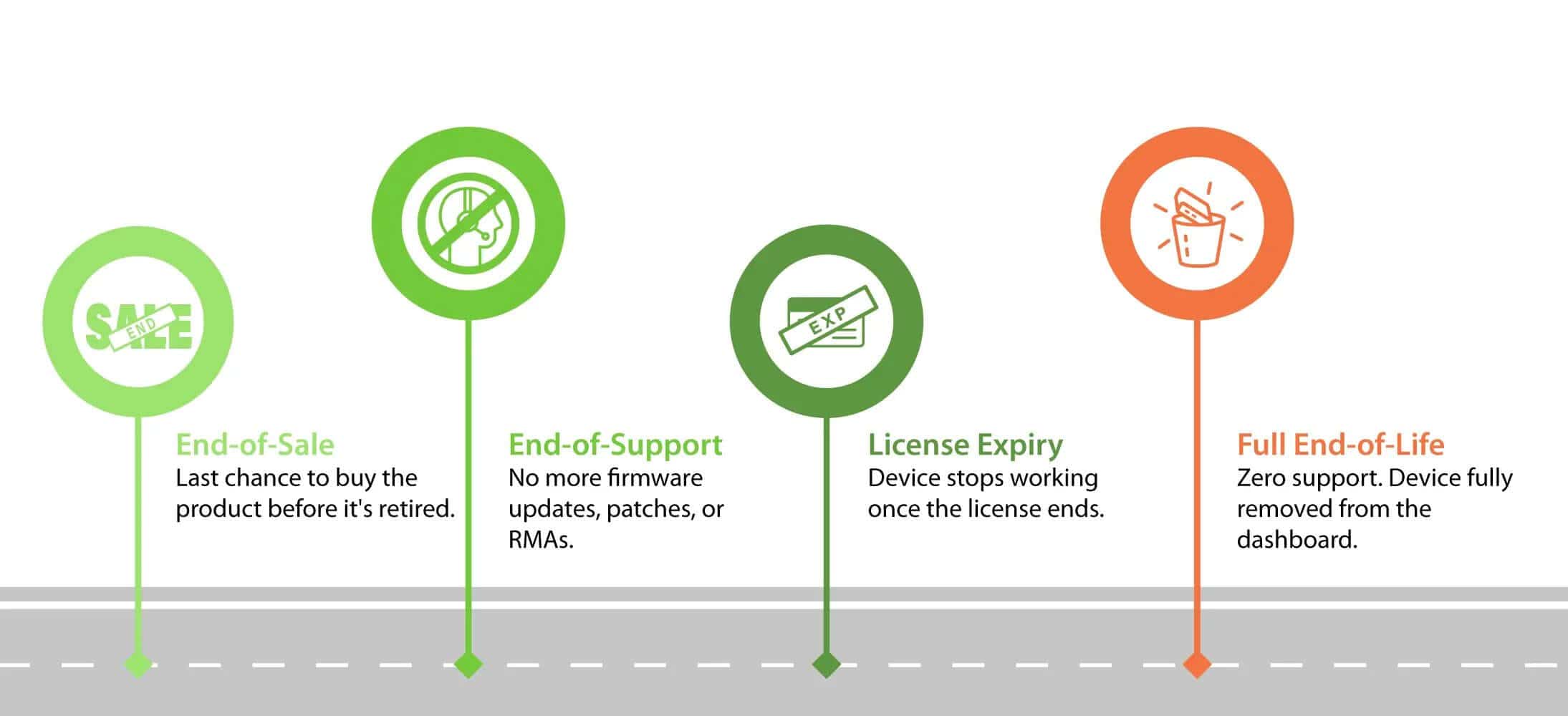
Cisco Meraki's EOL process unfolds over several steps, each with its own implications for support and replacement timelines.
End-of-Sale (EOS): Cisco announces the last day the product can be ordered. Licenses can still be renewed (for now), and support remains active. EOS dates typically give customers 6–12 months to finalize purchases.
End-of-Support: This is the big one. Meraki stops releasing firmware updates and security patches. Hardware RMAs and troubleshooting assistance also come to an end. Typically arrives 2–5 years after EOS.
License Expiry: Once your license ends, that’s it. You can’t renew it, and your hardware becomes unusable in the Meraki cloud dashboard. At this point, the device becomes little more than a paperweight.
Full End-of-Life: The product is completely retired from Cisco Meraki's portfolio. It disappears from the dashboard and receives zero support.
Cisco Meraki Products Already At or Past End-of-Life
If you’re using any of the following models, it might be time to build an upgrade strategy. These devices are either already in the EOL process or approaching it.
Access Points (MR Series)
MR18 (legacy model): Released in 2013 and marked end-of-sale in 2017. Known for its compact design and basic 802.11n capabilities.
MR33: Introduced in 2016 and entered EOL in 2023. A popular choice for SMBs with Wave 2 wireless support.
MR42: EOS in 2022. Offered 3x3 MU-MIMO and dual-band support for mid-density environments.
MR52: This high-density access point reached end-of-sale in 2022 and end-of-support will follow by 2027.
MR53: A more powerful version of the MR52, EOS in late 2022. Known for Wave 2 with 4x4 MU-MIMO and performance-heavy environments.
Security & SD-WAN Appliances (MX Series)
MX60/MX60W: Among the earliest MX devices, EOS in 2016 and long since ended its support. Time to retire it.
MX64 / MX64W: EOS in 2023. Still widely deployed in small branches; prepare for limited support over the next 2–3 years.
MX65 / MX65W: EOS in late 2023. Offers integrated PoE and built-in firewall capabilities.
MX80: A now-legacy enterprise appliance, EOS as early as 2018.
Z1 (teleworker gateway): EOS in 2020. Replaced by newer Z-series models like the Z3.
Switches (MS Series)
MS22 / MS42: These early-generation Layer 2 and Layer 3 switches reached EOS around 2016. Very few remain in active use.
MS220 / MS320 families: EOS in 2017–2018. Phased out in favor of more energy-efficient models with stacking support.
MS350-24P (early models): Specific early production batches were sunset ahead of newer iterations in the same family.
Cameras (MV Series)
MV21: Part of Meraki’s first camera generation. EOS in 2019, with final license and support expiration approaching.
MV71: Ruggedized outdoor variant of MV21. Also EOS in 2019.
Other Devices
MC74 (VoIP phone – entire product line discontinued): Cisco exited the VoIP hardware space completely in 2017. These phones are no longer supported.
Systems Manager Legacy Licenses (device management): Some legacy SM plans can no longer be renewed. Upgrade to the current SM licensing tiers is recommended.
Staying on top of announcements from Cisco is key. Their EOL product list updates often and includes timelines for each model.
What Still Works After End of Life?
Let’s clear up a common misconception: your gear doesn’t instantly stop functioning the day it hits EOL. But the functionality becomes limited.
Here’s what you can still expect:
Hardware usually keeps running: Devices continue to function normally as long as they don't fail physically.
Dashboard access often continues: You can still log in and manage the devices through the Meraki dashboard until the license expires.
Here’s what you lose:
No new firmware or security updates: Your devices won't get bug fixes or protections against emerging threats.
No RMAs or tech support from Cisco: You can't request hardware replacements or get help through Meraki support channels.
No way to renew licenses after expiration: Once your license ends, there's no path to extend usage—the device becomes inactive in the cloud platform.
The hardware may still pass packets, but every month post-EOL makes it riskier to leave it in place. That risk is manageable if you have a plan.
Why Staying Updated Matters (Even If Your Gear Works)
There are IT teams out there still running MR18s or MX60s because "they still power on." That logic works until it doesn’t. Here’s why holding onto outdated gear eventually backfires:
No security patches: These leave your network vulnerable to known exploits that won't be addressed.
Newer apps and tools: These may not be compatible with old hardware, causing unpredictable issues or loss of functionality.
Firmware freezes: These mean performance issues can’t be corrected through updates or fixes.
Support teams: These can’t help you troubleshoot once official assistance is discontinued.
Performance degradation happens slowly, until a sudden outage exposes the weak link. And when vendors can’t help, your hands are tied.
Building an Upgrade Plan That Makes Sense
You don’t have to overhaul everything at once. Smart IT teams build phased upgrade plans that align with business goals and budget cycles.
Here’s a simple framework:
Audit your gear: Tag each device by lifecycle stage: active, EOS, end-of-support, expired license
Group upgrades: Prioritize high-risk devices or critical sites
Phase replacements: Spread costs across fiscal quarters or budget periods
Align with licensing: Replace before licenses expire to avoid downtime
Document it all: A living asset list helps with long-term planning
Also, consider standardizing across sites with the same models. It reduces complexity and shortens troubleshooting time later.
How Hummingbird Helps IT Teams Handle End of Life
End-of-life doesn’t need to turn into a fire drill. At Hummingbird Networks, we work closely with IT teams to identify aging hardware before it causes problems, recommend Meraki replacements that fit your environment, align upgrades with your existing licenses and budget windows, and offer rapid quotes, expert guidance, and hands-on support.
Whether you're replacing a few access points or refreshing your entire stack, our team helps make the process smooth. You’ll get straight answers and actual strategy, not pushy upselling.
Stay Ahead Of Cisco Meraki End-of-Life Changes
If you're managing Cisco Meraki gear, don’t wait for an outage to start planning. Once support ends, you lose access to firmware updates, replacements, and technical help. Even a small issue can quickly spiral into a full-blown emergency. Every unsupported device adds risk and limits your recovery options. Staying ahead means replacing gear on your schedule, not during a fire drill.
It gives your team time to test, document, and deploy with confidence. You can also take advantage of newer hardware features that boost performance and reliability. Planning early means aligning replacements with budget cycles and avoiding rushed decisions. It’s easier to upgrade when you have options, not when your hand is forced.
Avoid costly surprises from unsupported Meraki hardware. Browse Cisco Meraki replacement options and get expert help planning your next move.
FAQs
Does my Meraki hardware stop working immediately at EOL?
No. Most devices keep functioning after EOL, but you lose firmware updates, bug fixes, and official support. Once the license expires, the device will no longer operate in the Meraki cloud platform.
Can I renew my license for an EOL Meraki product?
No. Once a device reaches its license end date post-EOL, it cannot be renewed. The hardware will stop functioning in the Meraki dashboard even if it still powers on.