Hardening Meraki Auto VPN For High Scale Performance

Table of Contents
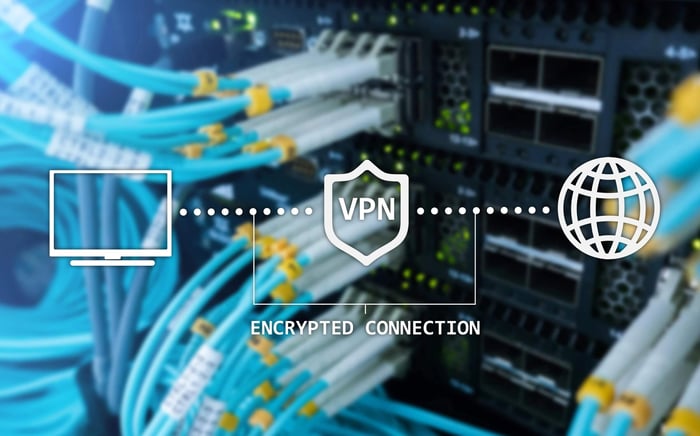
Cisco Meraki Auto VPN is often referred to as "magic" because it abstracts complex IPsec operations and key exchanges into a few simple clicks. For a network administrator, this simplicity saves time connecting remote sites. This allows you to avoid manually configuring crypto maps.
However, scaling hides critical mechanics. When you grow from ten sites to hundreds, stability depends on what happens under the hood. You must engineer the network to survive ISP issues and high traffic demands.
This isn't just about turning the feature on. It requires architectural choices to prevent routing loops and CPU exhaustion. We will look at registry mechanics, NAT traversal, and routing decisions that keep a VPN domain stable.
Orchestrating The Control Plane And Registry Handshakes
The Meraki Auto VPN system relies on out-of-band communication.
Your MX appliance talks to the cloud-based VPN registry first. It advertises its public IP address, local subnets, and active uplink IPs. The registry acts as a "matchmaker." It introduces peers who have never seen each other.
If this control plane fails, the data plane never forms. The VPN tunnels cannot start.
The most common failure isn’t a crypto mismatch but an upstream firewall blocking specific UDP ports. If your edge router or internet gateway filters these packets, MX devices cannot negotiate parameters.
UDP Hole Punching And NAT Traversal Logic
Meraki MX appliances use UDP hole punching to traverse Network Address Translation (NAT).
The MX initiates an outbound connection to the registry. This creates a temporary entry in the upstream NAT table. The registry shares this port mapping with the peer. Finally, the two devices communicate directly, even behind private IPs.
Registry Keepalives And Convergence Timers
Once the connection is up, the MX sends keepalives.
These confirm the tunnel is reachable. If packet loss or internet connectivity issues stop these keepalives, the registry updates the peer list. Understanding these timers is critical. They dictate how fast your network shifts traffic to a secondary WAN or backup VPN hub.
Manual Port Forwarding For Restricted NAT
In environments with unfriendly upstream ISP firewalls, automatic hole-punching fails.
If the upstream device uses "Symmetric NAT," you must switch from "Automatic" to "Manual" NAT traversal. To ensure the registry and peers connect, configure your upstream firewall rules with these steps:
Open UDP Port 9350: This is the default for local management and registry communication.
Open UDP Ports 9351–9381: This range handles VPN tunnels and traffic between peers.
Set Source/Destination: Allow traffic originating from the MX WAN interface to the Meraki Cloud IPs.
Validating Cloud Connectivity States
Check the "Uplink" tab on the appliance status page. If the device cannot reach the Meraki cloud, the registry handshake fails. Your auto VPN configuration will remain down regardless of local settings.
Building Resilient Topologies And Tunnel Math
Topology design is where growing networks hit a wall.
In a full mesh, every MX connects to every other MX. This creates a tunnel count approximately equal to $n \times (n-1)$, multiplied by the number of active WAN links. While this offers redundancy, it creates massive overhead.
Entry-level Meraki MX hardware hits CPU limits managing this state. If you use dual WAN uplinks, you multiply the number of stateful tunnels according to the uplink count. You must calculate your tunnel count before you deploy.
Mesh versus Hub And Spoke Resource Consumption
To reduce state table sprawl, use a hub-and-spoke configuration. This keeps regional traffic on its intended path.
Full Mesh: Use for small deployments where site VPN latency must be low.
Hub and Spoke: Use for large networks. Offload processing to a robust headend VPN concentrator.
Dual WAN Uplink Multiplier Effects
Enabling a second WAN creates a matrix of paths.
Each branch MX attempts to build tunnels from both WAN 1 and WAN 2 to the Hub's uplinks. This increases tunnel count and memory/state overhead on smaller appliances.
Regional Hub Priority And Weighting
For distributed networks, assign VPN hubs specific priorities.
A branch in New York should connect to the New York data center first. It uses the California data center only as a failover. This keeps latency low. It prevents cross-country tromboning of local traffic.
Data Center Integration And High Availability
Integrating Meraki Auto VPN into a data center requires precise routing.
The one-armed VPN concentrator mode is the standard here. It allows the MX to focus on encryption. It avoids handling complex LAN routing or NAT.
However, this setup causes routing loops if configured poorly. You need static return routes or dynamic routing from the core switch to the MX to prevent traffic from leaving the intended VPN path.
One-Armed Concentrator Routing Logic
In VPN concentrator mode, the device differs from routed mode.
The MX has a single interface on the data center network. It advertises remote sites and relevant subnets to the core switch. It encrypts traffic destined for those branches. The physical design is simple, but logical routing requires care.
Static Routes And Core Switch Handshakes
Your core layer 3 switch must know where to send return traffic.
The path to branch subnets lies through the MX's local interface IP address. You must configure static routes on the core switch for every specific subnet. Point them to the MX. Alternatively, dynamic routing protocols like OSPF or BGP can automate this.
Virtual IP Registration In HA Pairs
High availability (HA) pairs introduce complexity. You must ensure the VPN registry tracks the correct peer during failover.
To maintain stability:
Configure a Virtual IP (VIP): Assign a shared static IP address on the LAN side (VRRP).
Registry Updates: The Meraki cloud detects a failure. It instructs peers to re-establish tunnels to the VIP.
Warm Spare Mode: Ensure the secondary MX is a synchronized warm spare. This keeps the update within the convergence window.
OSPF And BGP Redistribution Mechanics
When using protocols like OSPF or BGP, the MX redistributes routes.
It shares routes from the Auto VPN domain to the LAN and vice versa. Filter advertisements carefully to avoid leaking internal private routes into the global internet.
Handling Asymmetric Routing In Multi-Hub Sites
Multiple VPN hubs at a single site can cause asymmetry.
Traffic might leave via one MX and try to return via another. Firewalls drop this traffic because return traffic misses the expected TCP handshake. Design your route table costs and flow preferences carefully. Ensure ingress and egress flow through the same appliance.
Diagnostics And Troubleshooting The Overlay
When users report issues, check the VPN Status page on the Meraki dashboard.
This is your source of truth. It shows real-time latency, jitter, and packet loss for every tunnel.
Distinguish packet loss from latency. High latency suggests congestion on the ISP side. Packet loss often points to Layer 1 issues or duplex mismatches. These metrics trigger security SD-WAN path selection. They move traffic from a primary MPLS line to a secondary link if thresholds are crossed.
Packet Loss Probes And SD WAN Decision Logic
Meraki MX appliances send small UDP probes across every tunnel.
You can configure policies to route voice traffic only over healthy links. If probes detect degradation, the MX moves the flow. This behavior follows Meraki SD-WAN logic based on loss and latency thresholds.
Identifying Fragmentation And MSS Clamping Issues
MTU size is a silent killer of VPN performance.
The IPsec header adds about 100 bytes of overhead. If your ISP handoff is 1500 bytes but the transport is PPPoE, packets are fragmented. This destroys throughput.
To resolve this, adjust the Maximum Segment Size (MSS):
Check the MTU: Verify the WAN interface MTU.
Calculate Overhead: Subtract approximately 100 bytes for IPsec.
Set MSS: Configure the MX so TCP packets fit inside the encrypted tunnel.
Use the Meraki dashboard's packet capture tool to spot dropped packets.
Keeping The VPN Domain Stable As You Scale
Meraki Auto VPN simplifies connectivity. But stability requires engineering.
A resilient network depends on hardware selection and precise routing decisions. You must understand the underlying Meraki Auto VPN mechanics and hardware limitations.
If performance dips during peak traffic or you hit tunnel limits, upgrade your topology. Optimize your Cisco Meraki infrastructure with certified guidance from Hummingbird Networks.
FAQs
1. Does Meraki Auto VPN work if my branch sites have dynamic Public IPs?
Yes. The VPN registry acts as a matchmaker for peers and dynamically updates IP info, allowing tunnels to form even if public IPs change.
2. What happens if my upstream firewall blocks UDP port 9350?
The tunnel will fail to establish. Missing these specific packets kills the tunnel before the data plane ever forms. You must ensure that UDP ports 9350–9381 outbound from the MX WAN to the Meraki cloud are allowed.
3. Why does enabling a second WAN link increase CPU usage on my Hub?
Enabling dual WAN uplinks increases tunnel count and memory/state overhead, which can cause entry-level and mid-range MX hardware to reach CPU limits.
4. How does SD-WAN interact with the Auto VPN tunnels?
SD-WAN operates on top of the VPN overlay. The MX uses packet loss and latency probes to trigger SD-WAN path selection shifts. This logic ensures that traffic is routed over the healthiest link based on real-time metrics.
5. Why am I seeing performance issues on non-standard fiber or DSL connections?
This is often due to fragmentation. The IPsec header adds approximately 100 bytes of overhead to every packet. If this extra overhead makes the packet exceed the MTU of the link (common on DSL), it can lead to fragmentation issues that degrade throughput.
6. Can I use a Hub-and-Spoke topology to improve performance?
Yes. A hub-and-spoke configuration is specifically designed for reducing state table sprawl. This topology offloads tunnel processing to a central concentrator and ensures that regional traffic stays within its intended path, rather than consuming resources on every branch appliance.
7. Why is traffic being dropped (black-holed) at my Data Center?
This usually occurs because return paths are missing or misconfigured in the data center routing. Configuring static routes or dynamic routing back to the MX is required.